

How to Use Midjourney (2026): A Beginner's Step-by-Step Guide
How to use Midjourney in 2026: set up an account, make your first image, write prompts that work, use the key parameters, and know if it's right for you.

Researched with AI assistance, reviewed and edited by Tapabrata Biswas.
In this article
Midjourney makes some of the best-looking AI images you can generate, and getting started with it is genuinely simple once you know two things up front: it is paid only, and you no longer need Discord to use it. This guide walks you from a blank account to your first good image, then to writing prompts and using the settings that separate a decent result from a great one.
One honest note before you start, because most guides bury it. Midjourney removed its free trial back in 2023, so there is no free way to try it, and the cheapest plan is about 10 dollars a month. If that is a dealbreaker, a free image generator will serve you better, and how Midjourney compares to the alternatives lays out when it is worth paying for. If you are ready to use it, here is how.
What Midjourney is and what it costs
Midjourney is a subscription AI image generator known for its strong default aesthetic, the polished, cinematic look it gives even to a simple prompt. That quality is the reason people pay for it, and paying is the only option, since there is no free tier.
There are four plans as of 2026. Basic runs about 10 dollars a month, Standard about 30, Pro about 60, and Mega about 120, with each step up adding more generation and faster speeds, and yearly billing knocking off roughly 20 percent. For learning and normal personal use, the Basic plan is plenty. You can always move up once you know you will use it.
How to set up Midjourney
Setup takes a couple of minutes. Go to midjourney.com and sign up, using a Google account, a Discord account, or an email address, all of which land you in the same web app. Older guides that tell you to join a Discord server and message a bot are out of date, that is no longer how most people use it.
Once you are in, pick a plan to activate your account, since generation needs an active subscription. Then open the imagine page, where a prompt bar at the top asks what you want to create. That bar is where everything starts.
How to create your first image
To make your first image, type a description into the prompt bar and press enter. On Discord the same thing is done by typing /imagine followed by your prompt. Either way, Midjourney returns a grid of four different takes on your idea in a few seconds.
From that grid you have a few moves. Upscale the one you like to get a larger, finished version. Use Vary, in a subtle or a strong flavour, to generate fresh variations close to or further from an image. And use the editor to change part of an image rather than starting over. The workflow is meant to be iterative, so treat the first four results as drafts and steer from there rather than expecting a perfect image on the first try.
a cozy reading nook by a rain-streaked window, warm lamplight, soft shadows, autumn evening, photographic --ar 16:9
How to write a Midjourney prompt that works
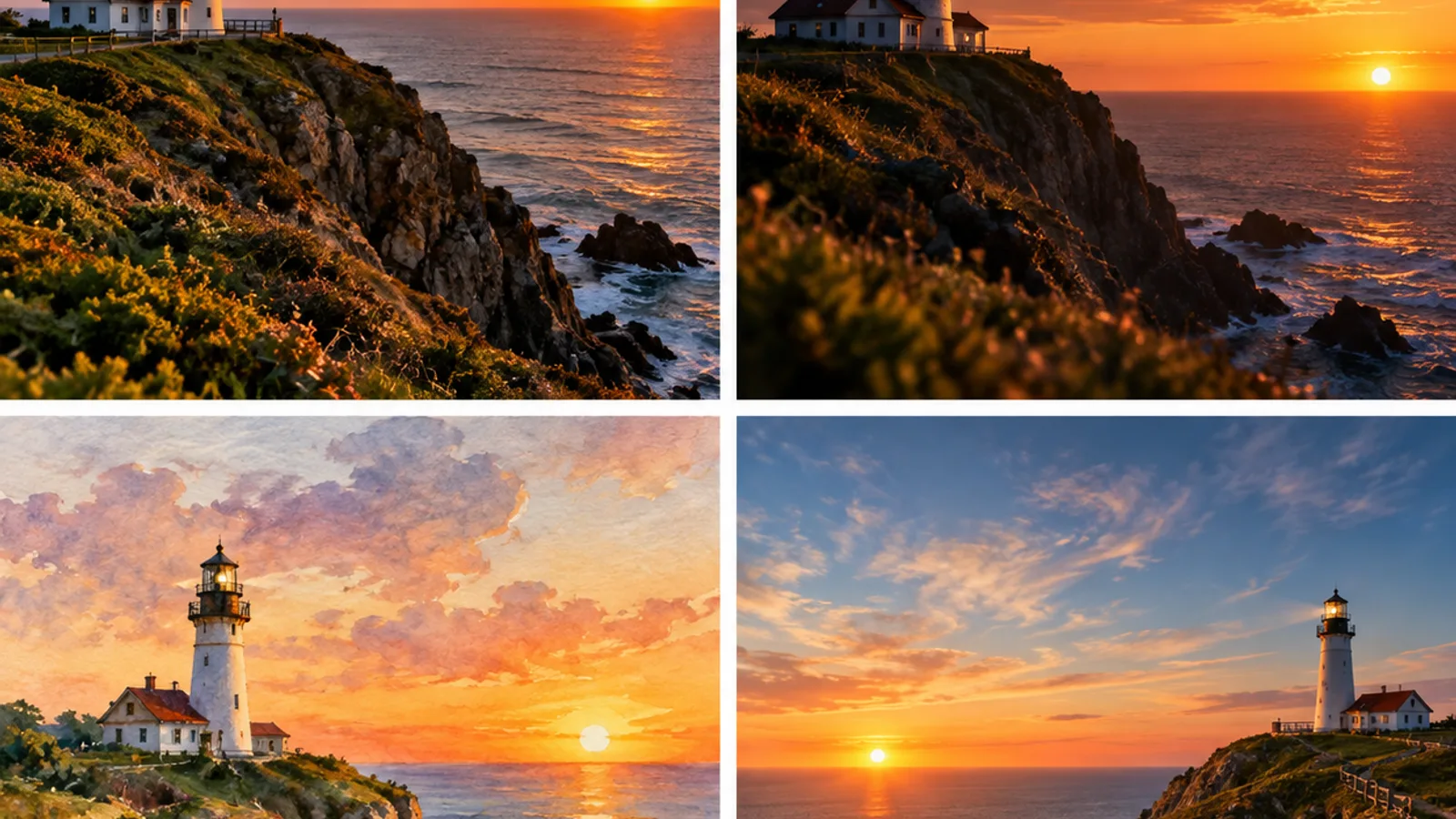
The single most useful habit is to lead with the subject. The first few words of a Midjourney prompt carry the most weight, so start with what the image is actually of, then layer on the style, the lighting, the mood, and the composition. A prompt that opens with "a lighthouse on a cliff at sunset" and then adds detail will beat one that buries the lighthouse after a paragraph of adjectives.
Keep the whole prompt reasonably short, under about 60 words, because Midjourney tends to act on the earlier part and lose the tail of a long, wordy prompt. Here is the difference. A vague prompt like "make a nice picture of a house" gives you a generic result. A structured one works far better:
a small stone cottage in a green valley, morning mist, golden light, wildflowers in the foreground, cinematic, highly detailed --ar 3:2
Notice the shape of it: subject first, then setting, then light, then style, then a parameter. That order is most of the skill.
The parameters worth knowing
Parameters are short settings you add to the end of a prompt to control the output. You do not need many to start, but four of them do most of the work.
| Parameter | What it does | Example |
|---|---|---|
--ar | Sets the aspect ratio (shape) | --ar 16:9 for widescreen |
--stylize | How much artistic interpretation, 0 to 1000 | --stylize 250 |
--chaos | How different the four results are, 0 to 100 | --chaos 30 |
--v | Which model version to use | --v 7 |
Beyond these, the recent versions add a few features worth knowing once you are comfortable. Draft Mode generates much faster and cheaper while you experiment, which saves your usage for the images you actually want to finish. And a character reference, set with --cref pointing at a face image and tuned with --cw, keeps the same character looking consistent across different scenes, which used to be nearly impossible. Make sure you are on the latest model, currently Version 7 with the Version 8 series rolling out through 2026, since each release improves prompt interpretation and realism.
Common beginner mistakes
A few things trip up almost everyone at the start. The first is writing long, wordy prompts, which dilutes the important words and confuses the model, so tighten your prompt rather than padding it. The second is forgetting the version, since an old model gives noticeably weaker results than the current one. The third is expecting accurate text, because Midjourney is genuinely weak at spelling words inside an image. If you need a real headline or logo, how Midjourney compares to the alternatives points you to ChatGPT's image generator, which handles text far better. And the last is over-editing a single image when starting fresh with a sharper prompt would get there faster.
Is Midjourney right for you
Midjourney is the right tool if your priority is a beautiful, finished-looking image and you are willing to pay for it. It is the wrong tool if you need something free, if you need reliable text inside the picture, or if you want to run a model on your own computer and fine-tune it. For those cases, how to use Nano Banana covers a strong free option from Google, and the prompt gallery has copy-ready ideas you can adapt. There is no shame in using two tools, a paid one for the look and a free one for quick jobs, and many people do exactly that.
What this post does not cover
This is a getting-started guide, not an advanced course in every parameter, style reference, or the video features Midjourney has begun adding. Prices, plans, and version numbers move quickly in this space, so treat the specifics here as a September 2026 snapshot and check midjourney.com for the current details before you subscribe. For choosing between the major generators, the comparison guide is the better read, and for the free field, the best free image generators covers the options.
Sources
- Midjourney, Midjourney (web app access, plans and pricing, and current model versions)
- Midjourney documentation, Midjourney (prompts, parameters, and features like character reference and Draft Mode)
Frequently asked questions

Written by
Tapabrata Biswas
Tech Researcher
I test AI productivity tools and research home-automation gear the way most people use them. Not in a lab, but on an ordinary desk with an ordinary internet connection. The only test that matters: does it save you time?
Share the Post with Your Besties
Get the plain-English tech brief
One email a week on AI tools and smart-home tech. No jargon, no hype.


