Presentations.ai Review (2026): I Tested the Free Plan, and How It Compares to Gamma
A hands-on Presentations.ai review: I tested the free plan, its deep-research flow, the export paywall, real pricing, and how it stacks up against Gamma.

Researched with AI assistance, reviewed and edited by Tapabrata Biswas.

In this article
- 01What is Presentations.ai, and is it worth it?
- 02Testing it: the deep-research flow
- 03What Presentations.ai does well
- 04Where Presentations.ai falls short
- 05Is Presentations.ai really free?
- 06Presentations.ai pricing
- 07Presentations.ai vs Gamma
- 08Who should use Presentations.ai, and who should skip it
- 09The verdict
- 10What this review does not cover
- 11Sources
Presentations.ai calls itself "ChatGPT for presentations," and after actually using it, that undersells the one thing it does differently. Most AI deck tools take a single prompt and generate. Presentations.ai interviews you first, asking for your company, your menu, your seat count, your projected revenue, and then researches before it builds. This review, based on hands-on use of the free plan, answers whether that extra depth is worth it, and how it stacks up against Gamma.
Short version: the research-first flow is genuinely its strength, and it produces a tailored, business-style deck. But the free plan is tight and cannot export anything, the Pro plan that unlocks export costs $20 a month, and for most people Gamma does a similar job for less. So the verdict comes down to who you are, which is what the rest of this covers.
A note on how this was tested: this is based on hands-on use of Presentations.ai's free plan in July 2026, plus its current published pricing and independent user feedback. I tried it myself, and there is no commission on anything here.
What is Presentations.ai, and is it worth it?
Presentations.ai is an AI tool that generates business presentations by interviewing you about your topic, researching the details, and building a structured deck you can then edit and share. Unlike a one-shot prompt tool, it front-loads questions to tailor the result.
Is it worth it? For a specific user, yes. If you want a deck that reflects real details about your business rather than generic filler, and you value the guided, research-based approach, it delivers, and it adds enterprise-grade security that most rivals lack. It is not worth it if you want a quick general deck, a genuinely free tool, or the cheapest path to a good result, because the export paywall and the $20 Pro price make it a harder sell than the alternatives. On the free plan it was impressive to use but frustrating to get anything out of.
Testing it: the deep-research flow
Signing up took seconds with a Google account, and, notably, no credit card was required, which is more than Beautiful.ai or Plus AI offer. The free account arrived with a 7-day boost of 90 credits.
Then the part that sets it apart. Instead of just generating from my prompt, it asked a series of follow-up questions: which company the deck was for, whether I had a menu to include, how many seats the shop offered, and the projected first-year revenue. It used those answers to research and build. About two to three minutes later I had a complete, tailored deck, and it cost 45 credits. The content was usable and clearly shaped by my answers, which is the real selling point: it feels less like a generator and more like a junior analyst drafting from a brief. The trade-off is that the credit meter moves fast, and at 45 credits a deck you get roughly two on the free plan.
What Presentations.ai does well
A few things stood out in real use, and they are the reasons to pick it over a plainer generator.
The research-first flow is the headline: the questions it asks produce a deck grounded in your details, not a generic template with your topic pasted in. The slide logic is strong, with each slide built around one idea and clean titles rather than walls of text. Editing the deck manually is easy, on par with Gamma. It accepts multiple inputs, so you can start from a prompt, a file, or an existing PowerPoint to redesign. And unlike most consumer AI deck tools, Presentations.ai is SOC 2 Type II certified with clear content ownership, which genuinely matters if your company's IT team has to approve the tool.
Where Presentations.ai falls short
None of these sank the experience, but they are what a review owes you before you pay.
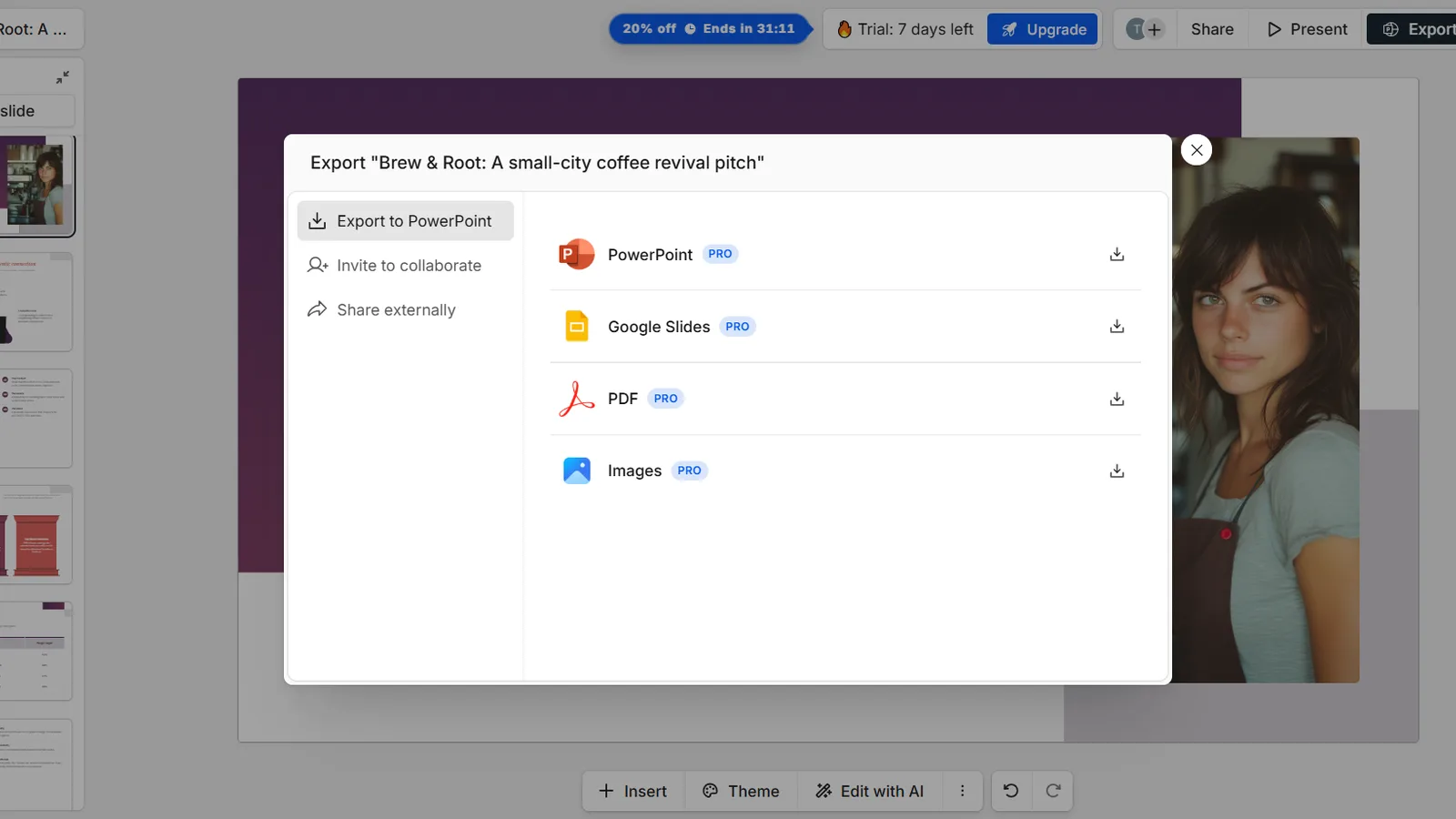
The biggest catch is export. On the free plan you cannot download anything: PowerPoint, Google Slides, PDF, and image export are all locked behind Pro. You can only share a link, and that free link appends a Presentations.ai promo slide (unbranded links are a paid feature too). Even on Pro, independent reviews note that exported files can shift fonts and layouts, so the handoff to PowerPoint is not always clean. The credits also drain quickly: 45 for a deck and 3 for every AI edit, against roughly 100 on the free plan. A real workflow limitation showed up too: once a deck is generated, the AI cannot simply add new slides to it; adding AI slides means starting over. Content can drift generic if you do not feed it good answers. And worth flagging honestly, even though I did not experience it in a short free test: Presentations.ai's Trustpilot reviews include billing complaints, with users reporting charges continuing after auto-renewal was turned off, so read the cancellation terms before you subscribe.
Is Presentations.ai really free?
There is a free plan, but "free" here means generate and share, not download and own. This is the single most important thing to understand before you invest time in it.
The free Starter plan gives about 100 credits, and a new signup gets a 7-day boosted trial of 90 credits, which is roughly two decks at 45 credits each. The credits do not refill generously, AI edits cost 3 each, and you cannot export to any file format. What you can do is share a public link, but that link carries a Presentations.ai promo slide. So the free plan is best treated as a way to evaluate the tool and the research flow, not as a way to actually produce and deliver presentations. For that, you are looking at Pro.
Presentations.ai pricing
Here is what you pay once the free credits run out, in USD as of July 2026. Regional pricing, such as in India, runs lower than these figures.
| Plan | Price (USD) | AI credits | Export (PPT/PDF)? | Best for |
|---|---|---|---|---|
| Starter | $0 (free) | About 100, no refill | No | Trying it out; generate and share only |
| Pro | $20/mo ($240/yr) | 5,000 a year | Yes | Individuals who need to export and want unbranded links |
| Gold | $100/mo ($1,200/yr) | 50,000 a year | Yes | Heavy users and teams wanting brand kit and analytics |
Price (USD)
- Starter
- $0 (free)
- Pro
- $20/mo ($240/yr)
- Gold
- $100/mo ($1,200/yr)
AI credits
- Starter
- About 100, no refill
- Pro
- 5,000 a year
- Gold
- 50,000 a year
Export (PPT/PDF)?
- Starter
- No
- Pro
- Yes
- Gold
- Yes
Best for
- Starter
- Trying it out; generate and share only
- Pro
- Individuals who need to export and want unbranded links
- Gold
- Heavy users and teams wanting brand kit and analytics
The line that matters is Pro at $20 a month, because that is where export and unbranded links unlock. Starter is fine for testing but cannot deliver a file. Gold at $100 a month is a team and heavy-user tier with a brand kit and analytics. If you want to weigh this against other tools, our roundup of the best AI tools has the wider field, and Presentations.ai fits the pitch-deck job in the freelancer's AI toolkit.
Presentations.ai vs Gamma
This is the comparison that decides it for most people, because the two tools aim at the same job from opposite directions. We reviewed Gamma hands-on too, so this is a like-for-like read.
Gamma wins on value and speed. It has a genuinely usable free tier, its paid plan starts at $9 a month against Presentations.ai's $20, and it generates web-native decks fast, with clean sharing. Presentations.ai wins on depth and business fit: the research-first questioning produces a more tailored deck, it exports to native PowerPoint (a paid feature, but a real one), and it carries SOC 2 security that Gamma lacks. In plain terms, Gamma is the better pick if you are an individual who wants a good deck quickly and cheaply, which is most people, and Presentations.ai earns its place if you need business-critical, export-heavy decks or your IT team requires the compliance. For the full hands-on picture of the cheaper option, see our hands-on Gamma review, and for the wider field, our best free AI presentation makers roundup.
Who should use Presentations.ai, and who should skip it
Judge it by what you need from the output, not by the demo. It fits some users well and frustrates others.
Use Presentations.ai if you want a deck grounded in your real business details, you value the guided research flow, you need reliable PowerPoint output, or your organisation requires enterprise security and content ownership. Skip it, or at least start with Gamma, if you want a quick general deck, you need a genuinely free tool that lets you export, or you are price-sensitive, because the $20 Pro plan and the export paywall make it the more expensive way to get a similar result.
The verdict
Presentations.ai is a genuinely clever tool with a real point of difference: it researches your topic before it builds, and the tailored result shows it. If that depth is what you are after, and you can live with the Pro price, it is a strong choice, especially for business and enterprise use where its security and PowerPoint output matter.
Would I pay for it? Not over Gamma. In testing, Gamma produced a comparable deck for less money and let me export on a cheaper plan, so for an individual it is the better value. The honest recommendation: try Presentations.ai free to feel the research flow, but unless you specifically need its business-grade features, put your money on the cheaper tool.
What this review does not cover
This is a hands-on review of Presentations.ai's presentation feature on the free plan, not a full test of its paid export fidelity, team features, or enterprise deployment. For where it sits among other tools, see the roundup linked above, and for the cheaper rival, the Gamma review. Pricing, credits, and features change quickly, and the export-quality and billing notes come from independent user reviews rather than my own paid experience, so treat every figure as accurate to July 2026 and check the official page before you pay.
Sources
- 24slides, Presentations.ai review and Deckary, Presentations.AI review (2026) (features, export paywall, pros and cons)
- SlideSpeak, Gamma vs Presentations.AI (2026) (value, security, and export comparison)
- G2, Presentations.ai reviews and Trustpilot (independent user feedback on billing and support)
Frequently asked questions

Written by
Tapabrata Biswas
Tech Researcher
I test AI productivity tools and research home-automation gear the way most people use them. Not in a lab, but on an ordinary desk with an ordinary internet connection. The only test that matters: does it save you time?
Share the Post with Your Besties
Get the plain-English tech brief
One email a week on AI tools and smart-home tech. No jargon, no hype.