How to Use Nano Banana: The Complete 2026 Prompt Guide
How to use Nano Banana, Google's Gemini image model: how to access it free, the prompt formula that works, editing tips, and Nano Banana vs Pro.

Researched with AI assistance, reviewed and edited by Tapabrata Biswas.
In this article
- 01What is Nano Banana?
- 02Nano Banana vs Nano Banana Pro
- 03How to access Nano Banana
- 04How to write a Nano Banana prompt
- 05Editing a photo is different from generating one
- 06How to keep a face or product consistent
- 07How to get readable text in an image
- 08Best practices and common mistakes
- 09Where to get ready-made prompts
- 10What this post does not cover
- 11Sources
In August 2025, an unnamed image model quietly climbed to the top of a public AI leaderboard, beating everything else at both generating and editing pictures, and nobody knew who built it. The only clue was a small banana icon. That model turned out to be Google's, and the placeholder name it was tested under, Nano Banana, stuck so hard that Google now uses it officially. It has since become one of the most-searched AI image tools in the world.
This is a practical guide to actually using it: what it is, how to get to it, and the prompt approach that separates a great result from a muddy one. Two honest notes before we start. Nano Banana is a creative image model, not a fact engine, so anything it writes as "information" (text, charts, labels) can be confidently wrong. And Google ships new versions fast, so treat the specific prices and limits here as current for August 2026, and you'll want to check the official pages before you rely on them.
What is Nano Banana?
Nano Banana is the nickname for Google's Gemini image model, a single AI that both generates images from a text description and edits photos you upload, all in plain conversation. It began as Gemini 2.5 Flash Image, which Google launched on 26 August 2025, per its developer blog. The name came from an anonymous placeholder Google used while blind-testing the model in public, and once it hit number one, the banana nickname was too good to drop.
Two things make it feel different from older image tools. It edits conversationally, so you can say "now make it night" and it'll change only what you asked, keeping the rest of the picture intact. And it carries Gemini's world knowledge, so it understands a described scene rather than just matching keywords.
One point that trips people up in 2026: Nano Banana is now a family, not one model. The original Gemini 2.5 Flash Image is the legacy version. Above it sit a fast, low-cost tier and Nano Banana Pro, the top-quality option. When a guide shows you a result, it's worth knowing which tier made it.
Nano Banana vs Nano Banana Pro
Nano Banana Pro is Gemini 3 Pro Image, the higher-quality tier that Google launched in November 2025, and the difference is easiest to see in text and detail. The standard tier is faster and cheaper and handles most everyday images and quick edits. Pro is the one to reach for when the image has to carry readable words, fine detail, or print at a large size.
| Feature | Nano Banana (standard) | Nano Banana Pro |
|---|---|---|
| Best for | Fast everyday images and quick edits | Posters, detailed scenes, print, anything with text |
| Resolution | About 1K (1024px) | Up to 2K and 4K |
| In-image text | Basic, short text only | Sharp, legible, even across languages |
| Reference images it blends | A few | Many, and keeps several people consistent |
| Speed and cost | Faster, cheaper | Slower, premium |
If you only take one rule from this table: the moment your image needs legible text, switch to Pro. That single upgrade is what the whole "Pro" tier was built around.
How to access Nano Banana
The fastest way in is the Gemini app, and it's free. Most guides skip this part and jump straight to prompts, but knowing where to run it decides how much you pay and what limits you hit.
There are three ways to use it:
- The Gemini app (gemini.google.com or the mobile app): free, with a daily image cap that depends on your plan. Start a chat, describe the image or upload a photo to edit, refine it over a few messages, and download. This is right for almost everyone.
- Google AI Studio: also free, with more generous limits for experimenting and comparing tiers. Better when you want to try lots of prompts without hitting the app's cap.
- The Gemini API or Vertex AI: paid, billed per image, for developers and anyone generating in bulk. As a rough guide, the legacy 2.5 Flash Image runs around a few cents per image, though exact pricing shifts and Pro costs more.
Nano Banana is also baked into other tools you may already use, including Google Slides, NotebookLM, Google Ads, Adobe, and Figma, so you can generate without leaving the app you're working in.
One thing to know before you build anything on it: every image gets an invisible SynthID watermark that marks it as AI-made and cannot be removed. On the free tier and Google AI Pro, images also get a small visible Gemini sparkle in the corner. Only Google AI Ultra and paid API outputs drop that visible mark, and even then SynthID stays. There's no fully unmarked image.
How to write a Nano Banana prompt
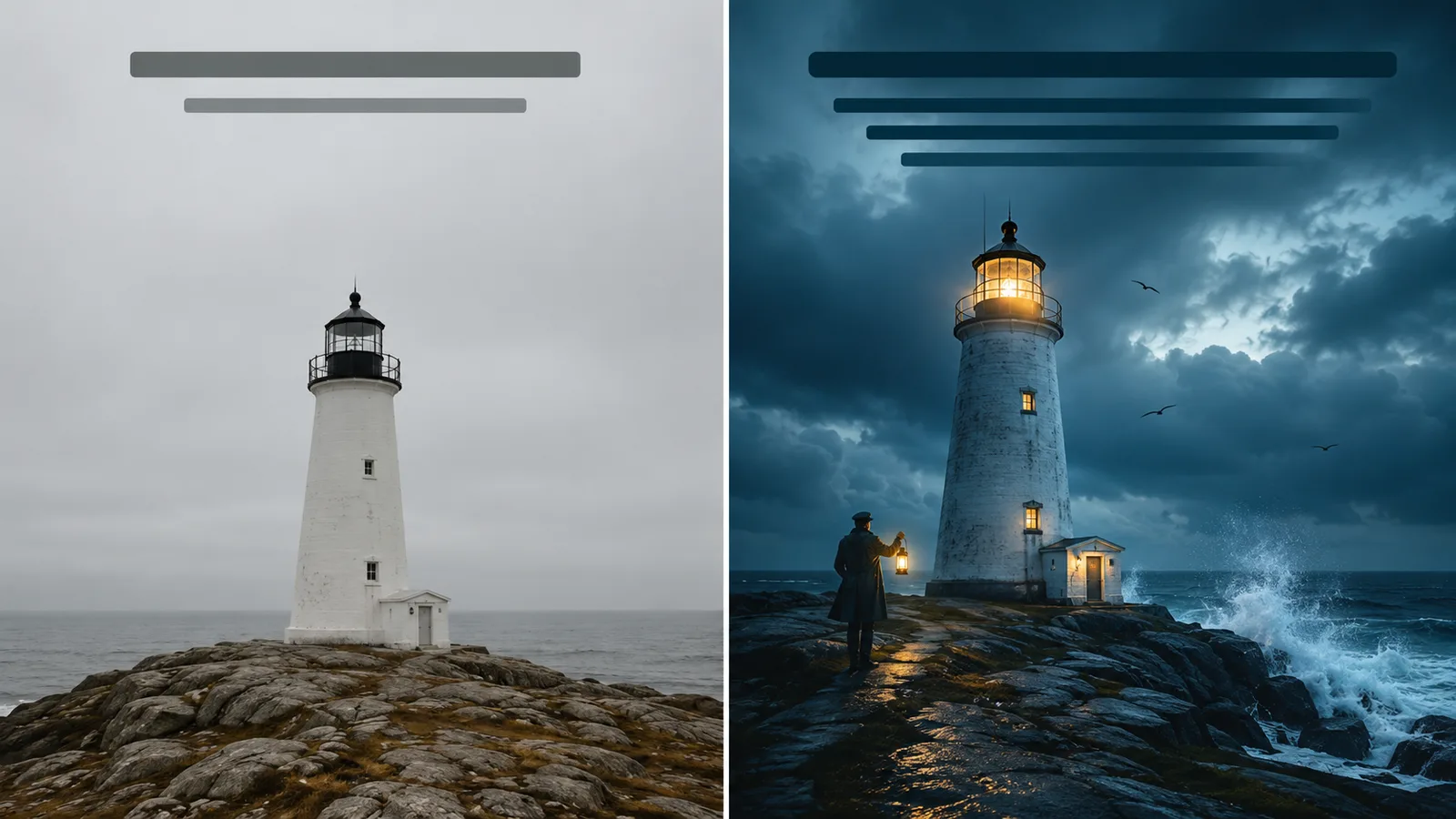
The single biggest shift is to describe a scene in full sentences, not a list of keywords. Nano Banana reads your prompt like a conversation, so "a lonely lighthouse keeper leaning into a storm at blue hour" beats "lighthouse, keeper, storm, dramatic, 4k." Google's own prompt guide is blunt about this: write like you're briefing a photographer, not tagging a stock photo.
A vague prompt gives you a generic, muddy result:
Make a picture of a lighthouse keeper.
Give it a real scene and it has something to work with. Google recommends covering five things, subject, composition, action, location, and style, then refining with camera, lighting, and materials:
A weather-beaten lighthouse keeper in his sixties, thick wool sweater and oilskin coat, gripping a brass lantern as he leans into the wind at the edge of a granite cliff. Storm surf explodes against the rocks below. Low-angle wide shot, the lighthouse looming behind him, 16:9. Shot on medium-format film, overcast blue-hour light with a single warm glow from the lantern, muted teal-and-slate colour grade, fine grain, cinematic and lonely mood.
The difference is everything after the subject. You can think like a cinematographer and it pays off:
- Lighting: "golden-hour backlight with long shadows," "harsh high-contrast chiaroscuro," "soft three-point studio light."
- Camera and lens: naming real gear steers the look. "Shot on medium-format film," "low angle with a shallow depth of field at f/1.8," "wide-angle for scale," even "direct-flash disposable-camera look."
- Colour and film: "muted teal cinematic grade," "as if on grainy 1980s film stock."
- Materials: upgrade the nouns. Not "a jacket" but "a navy tweed blazer"; not "a mug" but "a matte ceramic mug."
One rule saves a lot of retries: use positive framing. Ask for "an empty street," not "a street with no cars." The model is unreliable at negatives, so describe what you do want to see. This is really just writing a clear prompt applied to pictures, and the same care carries over to the wider set of Gemini prompts for text.
Editing a photo is different from generating one
When you edit, you already have an image, so the prompt should focus on what changes and what stays the same. Start with the action, name the exact change, then lock down everything that should not move. That last part is what people forget, and it's why edits drift.
Using the uploaded photo, change the season to deep winter: cover the ground and rooftops in fresh snow, add soft falling flakes and breath-fog. Keep the woman's face, hairstyle, red coat, and standing pose exactly the same, and keep the camera angle and framing identical. Match the softer, cooler daylight to the new snowy scene.
Then refine in conversation instead of rewriting from scratch. "Make the snow heavier," "warm up the light a little," "add a scarf." Each message adjusts the last image. This multi-turn editing is the part Nano Banana does better than most tools, and it works best on Nano Banana Pro when the edit is complex.
How to keep a face or product consistent
Consistency comes from naming your subject and giving it a reference. Attach a photo, label the subject clearly in the prompt, then refer back to that label in every scene. The model treats the name as a stable identity and drifts less.
Reference image attached. Call this character 'Mira'. Generate three images of Mira with the same face, freckles, and short copper hair in all three: (1) Mira laughing in a sunlit farmers' market holding a basket of oranges; (2) Mira on a rain-soaked city street at night under a neon sign, shot with a shallow depth of field; (3) Mira at a wooden desk sketching by warm lamplight. Photographic, natural skin texture, consistent identity throughout.
The same trick works for a product: name it, attach a clean shot, and it stays on-brand across a whole set. Nano Banana Pro holds several people consistent in one image and accepts many reference photos, so it's the tier for a real character or campaign. Whichever you use, say the face or the label should stay identical, because a long chain of edits can quietly change it.
How to get readable text in an image
Getting words right in an image comes down to three habits. First, put the exact text in quotes so the model knows what to render. Second, describe the typography. Third, keep it short, because small or dense text is still where these models slip.
A minimalist event poster, 9:16 vertical, warm cream background with a single stylised coffee cup illustration centred. At the top, the words 'SLOW MORNINGS' in a bold geometric sans-serif. Below the cup, the line 'Neighborhood Coffee Bar' in a thin elegant serif. Crisp, perfectly legible text, generous negative space, muted terracotta and sage palette, modern editorial design.
This is the technique that most needs Nano Banana Pro. The standard tier can manage a short headline, but Pro is the one built to render clean, legible text, and it can even handle more than one language in the same image. If a word comes out garbled, shorten it or ask Gemini to write the copy first, then generate the image using that final text.
Best practices and common mistakes
Most weak results come from a handful of fixable habits. The good ones:
- Describe a scene in sentences, not a pile of keywords.
- Use positive framing. Say what should be there, not what should not.
- Name the camera, lens, lighting, and materials when the look matters.
- Put text in quotes and describe the font.
- For consistency, always pair a reference image with an explicit "keep the same face" instruction.
- Edit conversationally, one change at a time, rather than restarting.
And the honest limits worth knowing before you trust an image:
- It's not a source of truth. Charts, labels, maps, and any "factual" text can be wrong, so verify anything that matters.
- Small or long text still garbles, even on Pro. Keep on-image copy short.
- Heavy composites can leave artifacts, like odd seams or warped hands.
- Long edit chains drift. Re-state what must stay fixed every few steps.
- The watermark is permanent. Don't promise anyone a clean, unmarked image.
- Real-person likeness has rules. The consistency features are for your own characters and products, not for impersonating real people.
Where to get ready-made prompts
If you'd rather start from something that works, we keep a growing Nano Banana prompt gallery with copy-and-paste prompts, each shown with a real sample of what it produces, from cinematic portraits and photo-edit transforms to product shots and poster designs. Copy one, swap in your own subject, and adjust the wording using the structure above. It pairs well with using ChatGPT to build a slide deck when you need visuals and slides together.
What this post does not cover
This is a practical guide to using Nano Banana through the Gemini app and writing prompts that work. It's not a developer tutorial for the Gemini API or Vertex AI, and it doesn't walk through every model tier's exact price, since those change often. It also does not compare Nano Banana against other image generators; the focus here is getting good results from this one.
Model names, free-tier caps, per-image prices, and watermark rules all move quickly, so treat the specifics as current to August 2026 and confirm anything that matters on Google's own pages before you rely on it, especially for commercial work.
Sources
- Introducing Gemini 2.5 Flash Image (Nano Banana), Google Developers Blog (launch, capabilities)
- Nano Banana Pro (Gemini 3 Pro Image), Google (Pro features, resolution, watermark)
- Prompting tips for Nano Banana Pro, Google (text rendering, consistency, limits)
- Gemini image prompt guide, Google DeepMind (the prompt structure)
- Ultimate prompting guide for Nano Banana, Google Cloud (prompt frameworks)
Frequently asked questions

Written by
Tapabrata Biswas
Tech Researcher
I test AI productivity tools and research home-automation gear the way most people use them. Not in a lab, but on an ordinary desk with an ordinary internet connection. The only test that matters: does it save you time?
Share the Post with Your Besties
Get the plain-English tech brief
One email a week on AI tools and smart-home tech. No jargon, no hype.