ChatGPT Prompts for Software Developers: 34 for Debugging, Reviews & Tests (2026)
34 copy-ready ChatGPT prompts for software developers: debugging, code review, refactoring, tests, docs, architecture, and where AI shouldn't lead.

Researched with AI assistance, reviewed and edited by Tapabrata Biswas.

In this article
- 01How to prompt as a developer
- 02Debugging and troubleshooting
- 03Code review and quality
- 04Refactoring and optimization
- 05Writing tests
- 06Documentation
- 07Architecture and design
- 08Understanding an unfamiliar codebase
- 09SQL, regex, git, and the fiddly bits
- 10PRs, commits, and shipping
- 11Where not to let ChatGPT lead
- 12What this post does not cover
- 13Sources
Most developer prompt lists hand you a one-liner like "debug this code" and wonder why the output is useless. The real difference in 2026 isn't whether you use AI, it's whether you feed it enough context to be right. Used well, ChatGPT is a fast, tireless pair-programmer for the engineering chores that eat your day: decoding errors, reviewing diffs, writing tests, generating docs. Used badly, it's a confident source of code that compiles and is quietly wrong. The prompts below are built for the first kind, each with a clear job, a place to paste your real code and error, and a verification step.
This is for working developers, not people learning to code; if you're still building the fundamentals, prompts for learning to code is the better starting point. Everything here works the same in ChatGPT, Claude, or Gemini, and there's an honest section at the end on where AI has no business leading, because in engineering that line is where bugs and security holes get in.
How to prompt as a developer
A prompt that fixes your bug and one that wastes ten minutes differ by context. Give the model a role, the language and version, the real code and the full error, what you expected versus what happened, what it may and may not change, and how to verify the result. Leave that out and it guesses, which is the problem behind writing a clearer prompt in any field, but especially here where a plausible wrong answer costs you a debugging session.
Here is the difference. The vague version:
Debug this code, it doesn't work.
And the version that actually helps, with role, context, and verification:
Act as a senior [language] engineer. Here's the error and stack trace: [paste]. Here are the 25 lines around where it fails: [paste]. Language version: [version]. Expected behaviour: [describe]. Actual behaviour: [describe]. Identify the most likely failure point, trace the root cause, and give me two or three fixes ranked by likelihood, each with how I'd verify it. Don't change anything outside the function shown.
The first gets a shrug. The second gets a ranked diagnosis you can test. Every prompt below is written in that second style, and the habit that matters most is pasting the real, non-sensitive code and error before you hit enter.
Debugging and troubleshooting
Debugging is where the context you provide most directly decides the answer, so this is where the payoff for a good prompt is highest. Paste the full error, the surrounding code, and the versions, and ask for ranked causes with a way to test each, rather than a single confident guess you then have to trust.
Act as a senior [language] engineer. Decode this error for me in plain terms: [paste full error and stack trace]. Tell me what it actually means, the most common causes, and the first three things I should check, in order. Then ask me for any context you'd need to narrow it down.
Here's a bug: expected [behaviour], but I'm getting [behaviour]. Relevant code: [paste]. Language and version: [version]. Walk through the code's logic step by step, point out where it diverges from what I expect, and give me the smallest change that fixes the root cause, not just the symptom.
This code works locally but fails in [environment]: [paste code and error]. List the environment-specific causes worth checking, config, versions, env vars, permissions, timeouts, networking, ranked by how likely they are for this stack, and how I'd confirm each.
I have an intermittent bug that's hard to reproduce: [describe the symptom and paste relevant code]. Give me the usual suspects for flaky behaviour here, race conditions, state, timing, external dependencies, and suggest logging or a minimal test that would help me catch it in the act.
Help me write a minimal reproducible example for this problem: [describe and paste code]. Strip it down to the smallest self-contained snippet that still shows the bug, so I can isolate it or file a clean issue. Tell me what you removed and why it's safe to remove.
Code review and quality
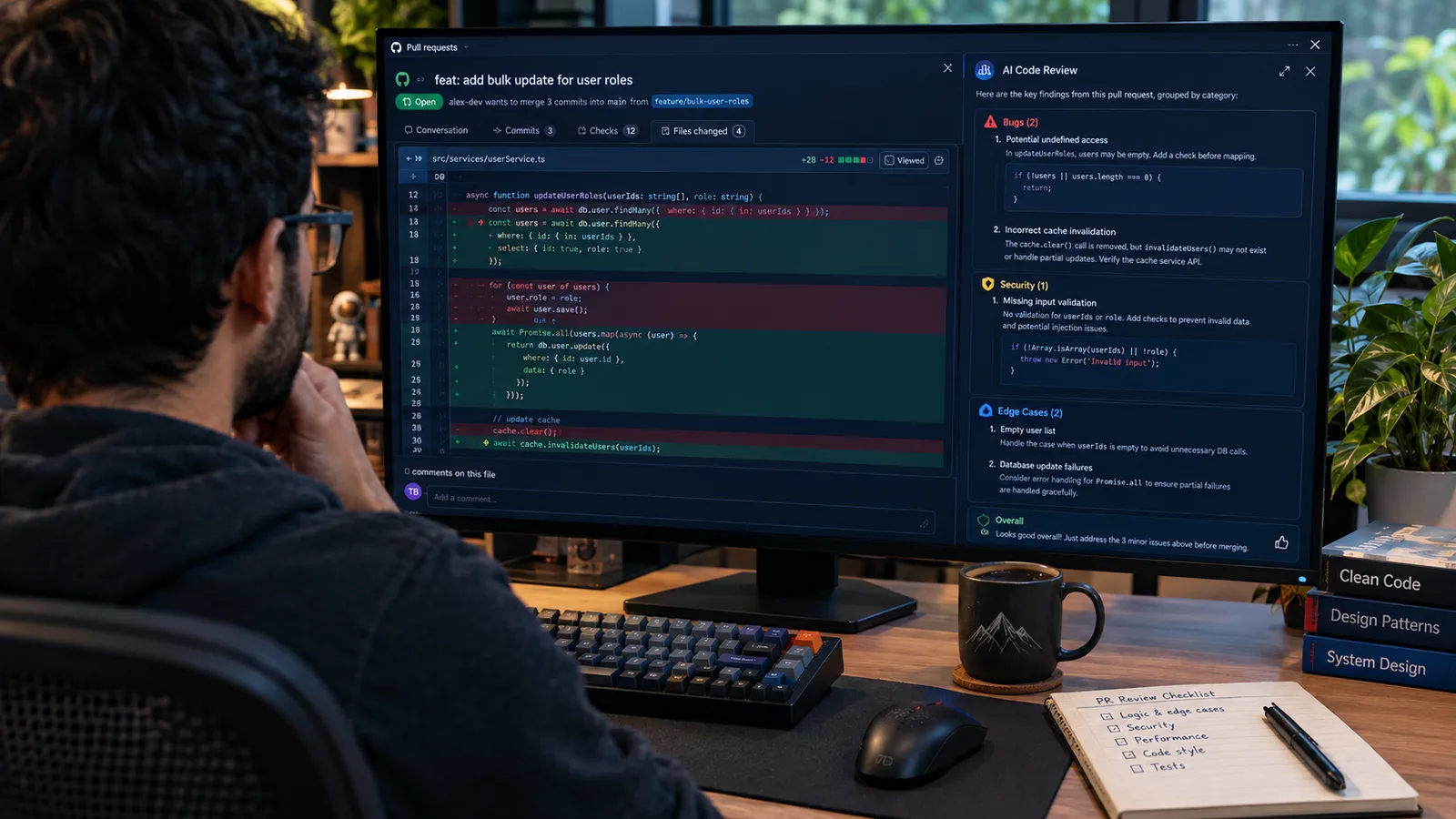
Code review is one of the highest-value uses, because a second set of eyes on a diff catches what you've stopped seeing after staring at it. ChatGPT is good at the mechanical pass, bugs, edge cases, obvious security holes, so you reach the human review with the easy stuff already handled. Just don't let it replace that human review; it's the first pass, not the last word.
Act as a thorough but pragmatic code reviewer. Review this diff: [paste]. Group your feedback into bugs and correctness, security, edge cases, readability, and nitpicks, and mark each as must-fix or optional. Be specific about why, and don't invent problems to seem thorough.
Review this code specifically for security issues: [paste]. Look for injection, unsafe input handling, exposed secrets, missing authorisation checks, and unsafe dependencies. For each finding, explain the risk and the fix, and tell me if you're unsure rather than guessing.
Stress-test this function for edge cases: [paste]. List the inputs and conditions most likely to break it, empty, null, huge, malformed, concurrent, boundary values, and for each say what would happen and whether it's handled. Then suggest the two or three worth guarding against.
Before I open a PR, review my own code as a skeptical teammate would: [paste]. Tell me what you'd push back on, what's unclear, and what I've probably missed, so I can fix it before a human sees it. Prioritise the three things most worth changing.
Refactoring and optimization
Refactoring is a great use because the behaviour is supposed to stay the same, which gives you a clear way to check the AI's work: your tests still pass. Tell it what to preserve, ask for the reasoning behind each change, and never accept a refactor you can't verify.
Refactor this code for readability without changing its behaviour: [paste]. Explain each change and why it's clearer, keep the same public interface and outputs, and flag anything where the refactor might subtly change behaviour so I can test it.
This function is too long and does too much: [paste]. Break it into smaller, well-named functions with single responsibilities, keep the external behaviour identical, and show me the new structure with a one-line note on what each piece does.
Help me optimise this for performance: [paste code, and describe the bottleneck or paste a profile if I have one]. Identify the likely hot path, suggest changes ranked by expected impact versus effort, and be honest about which are premature optimisation I can skip. Don't sacrifice correctness for speed.
Find and reduce duplication across these snippets: [paste]. Suggest a clean shared abstraction only where it genuinely helps, warn me if extracting it would be over-engineering, and keep the result easy to read rather than clever.
Writing tests
Tests are where ChatGPT saves real time and quietly misleads you at the same time. It writes thorough scaffolding and catches edge cases you'd have missed, and it tends to test what the code does rather than what it should do, so it will happily write a passing test for a bug. Generate with it, then read the assertions yourself before you trust the green checkmark.
Write unit tests for this function using [test framework]: [paste]. Cover the happy path, edge cases, and error states, name each test by what it checks, and tell me which behaviours you weren't sure about so I can confirm the assertions are actually correct, not just passing.
Here's a function and its intended behaviour: [paste code and spec]. List the test cases I should have before I trust this, including the nasty edge cases people forget, and mark which are must-have versus nice-to-have. Then write the must-haves in [framework].
Act as a QA engineer. Given this feature, [describe and paste key code], write a test plan: the scenarios to cover, the edge and failure cases, and the one or two integration points most likely to break. Keep it to what actually reduces risk, not exhaustive box-ticking.
I'm doing TDD. Here's the spec for a function I haven't written yet: [describe]. Write the failing tests first in [framework], covering the behaviour and edge cases, so I can implement against them. Don't write the implementation, just the tests.
Documentation
Documentation is the chore developers skip and AI genuinely helps with, as long as you check it describes what the code does rather than what it guessed. Give it the real code and your audience, and treat the draft as a strong first pass to correct, not final copy.
Write clear docstrings or comments for this code: [paste]. Explain what each function does, its parameters and return, and any non-obvious behaviour or side effects, in the [language] convention. Comment the why, not the obvious what, and don't restate the code line by line.
Draft a README for this project: [paste key files or describe]. Cover what it does, how to install and run it, basic usage with an example, and configuration. Keep it skimmable for a developer landing on it cold, and mark anything you had to assume so I can correct it.
Generate API documentation for these endpoints: [paste routes or code]. For each, give the method, path, parameters, request and response examples, and error responses, in a clean table or the [format] style. Flag any endpoint where the behaviour isn't clear from the code.
Explain this complex or unfamiliar function to me like a senior engineer walking a new teammate through it: [paste]. Cover what it does, why it's built this way, and the gotchas, then note anything that looks like a bug or a smell worth a second look.
Architecture and design
Act as a staff engineer. I need to design [component or system]. Requirements: [list]. Constraints: [list, e.g. scale, latency, team, stack]. Propose two or three approaches, with the trade-offs of each, and recommend one with your reasoning. Call out the assumptions that would change the answer.
Compare [approach A] versus [approach B] for [problem], given my context: [describe]. Give me an honest trade-off table across the dimensions that matter here, performance, complexity, cost, maintainability, and tell me which you'd choose and when the other one wins instead.
Review my proposed design as a skeptical architect: [describe or paste]. Where will this struggle at scale, what failure modes am I not handling, and what's the simplest version that would still meet the requirements? Argue the case against it before you agree with it.
Which design pattern, if any, fits this problem: [describe]? Suggest one or two that genuinely apply, show roughly how they'd look in [language], and warn me if reaching for a pattern here would add complexity without real benefit. Plain code beats a clever pattern I don't need.
Understanding an unfamiliar codebase
Explain this module I've inherited: [paste]. Give me the high-level purpose, how the main pieces fit together, the key data flow, and the parts I should be careful editing. Assume I know the language but not this codebase.
Trace how [a request / an event / a value] flows through this code: [paste relevant files]. Walk it step by step from entry to result, name the functions it passes through, and flag where state changes or something could go wrong.
I'm onboarding to this codebase. Based on these files, [paste or describe structure], give me a mental map: the main components, the conventions the team seems to follow, and the five files I should read first to understand how it works.
SQL, regex, git, and the fiddly bits
Write a [dialect] SQL query that [describe what you need]. Here's the relevant schema: [paste]. Explain what the query does, watch for performance on large tables, and suggest an index if it would help. Then show me one edge case that might return wrong results.
Build a regex that matches [describe precisely, with examples that should and shouldn't match]. Explain each part of the pattern in plain terms, note the flavour or flags it needs, and give me a couple of test strings to confirm it, including a tricky one.
I need to [describe a git or shell task, e.g. undo a merge, rewrite the last commit, find a string across history]. Give me the exact command, explain what each part does and what it changes, and warn me clearly if it's destructive or rewrites history before I run it.
PRs, commits, and shipping
Write a pull request description for this change: [paste the diff or describe]. Include what changed and why, how to test it, any risks or follow-ups, and anything a reviewer should focus on. Keep it concise and skimmable, not a wall of text.
Write a clear commit message for this change following conventional commits: [paste diff or describe]. A concise summary line under 72 characters, then a short body on the what and why if it's non-trivial. No filler.
Draft a changelog entry for this release from these merged changes: [paste PR titles or notes]. Group them into features, fixes, and breaking changes, write each in user-facing language rather than internal jargon, and flag anything that needs a migration note.
Where not to let ChatGPT lead
Here is the honest part, and for engineers it's the part that keeps bad code out of production. ChatGPT is a strong assistant and a poor authority, so the judgment stays with you.
Watch for hallucinated dependencies above all. It will confidently import a package that doesn't exist or call an API with the wrong signature, and a made-up package name is not just a bug but a supply-chain risk, since attackers register those hallucinated names, so verify every library and function before you trust it. Assume its code can be confidently wrong: it compiles, it looks right, and it's subtly broken, so run it and test it rather than reading it and believing it. Never paste secrets, keys, or proprietary and production code into a consumer chatbot, because that data can be retained; strip it down to a generic snippet or use a company-approved tool. And never merge code you don't understand, because surveys consistently show a large share of AI-suggested code gets rejected on review, and the ones that slip through are how subtle bugs ship. Used inside those lines, it clears the busywork and makes a capable engineer faster. Outside them, it's a very fast way to ship a bug. For the bigger shift toward AI writing whole features, our take on building with agentic AI tools covers where that helps and where it bites.
What this post does not cover
This is a working set of prompts and how to use them safely, not a programming course or a guide to any specific AI coding tool or IDE assistant. The prompts are starting points to adapt, and they assume you'll paste your own real, non-sensitive code and run and review every output before it reaches a branch. Nothing here replaces testing, code review, and understanding your own code. If you're still learning the fundamentals, prompts for learning to code is built for that instead.
Sources
- Prompt engineering guide, OpenAI (the role, context, task, and verification principles behind the prompts here)
- Stack Overflow Developer Survey, Stack Overflow (developer AI adoption and how much AI-assisted code is trusted)
Frequently asked questions

Written by
Tapabrata Biswas
Tech Researcher
I test AI productivity tools and research home-automation gear the way most people use them. Not in a lab, but on an ordinary desk with an ordinary internet connection. The only test that matters: does it save you time?
Share the Post with Your Besties
Get the plain-English tech brief
One email a week on AI tools and smart-home tech. No jargon, no hype.